



Frequently asked questions - Customer account and orders
To access your account on the new website, you must update your password.
Here is the procedure to follow:
You should have received an Innelec email with a password setup link. Please check your spam folder if necessary.
Click the link to create your password.
Log in using your email address and your password.
IMPORTANT: Your login has changed; you must now use your email address to sign in.
To create an account, go to the Create an account page and complete the online form. For your first order, the account opening request must be submitted on the www.innelec.com website and accompanied by your bank details (RIB), a K-Bis extract dated within the last 3 months, and a copy of both sides of the passport or identity card of the Director or Manager.
Go to the login page and click on ‘Forgot your password?’, enter your associated email address to receive a password reset link.
You can track your orders for reserved products (= in stock) and backorders (= being restocked) or view your order history in the menu under ‘Product portfolio’. You can track your parcels that are being prepared, delivered or shipped via the ‘Parcel tracking’ section.
Your invoices and delivery notes are available in your dedicated space, in My account > Your documents.
You can print your invoices directly by clicking on the ‘shipped’ status in the order or parcel tracking section.
From your customer account, go to the Product Portfolio page to view your current free shipping status. This information can also be viewed from the home page when you are logged in.
To ship your reserved products on hold, there are two ways to proceed.
Method 1: Initiate delivery of reserved products on hold only
Go to the Product Portfolio page and click on the ‘Send for delivery’ button.
If your free delivery threshold has not been reached, we recommend that you add new products to your basket before initiating delivery to avoid paying transport costs.
Method 2: Initiate delivery of reserved products when placing an order
When you finalise an order, there is an option to tick ‘Order + delivery’ which allows you to immediately send all products ordered and awaiting delivery (see image below). Please note that this option will initiate a delivery request for all your reserved products awaiting delivery.
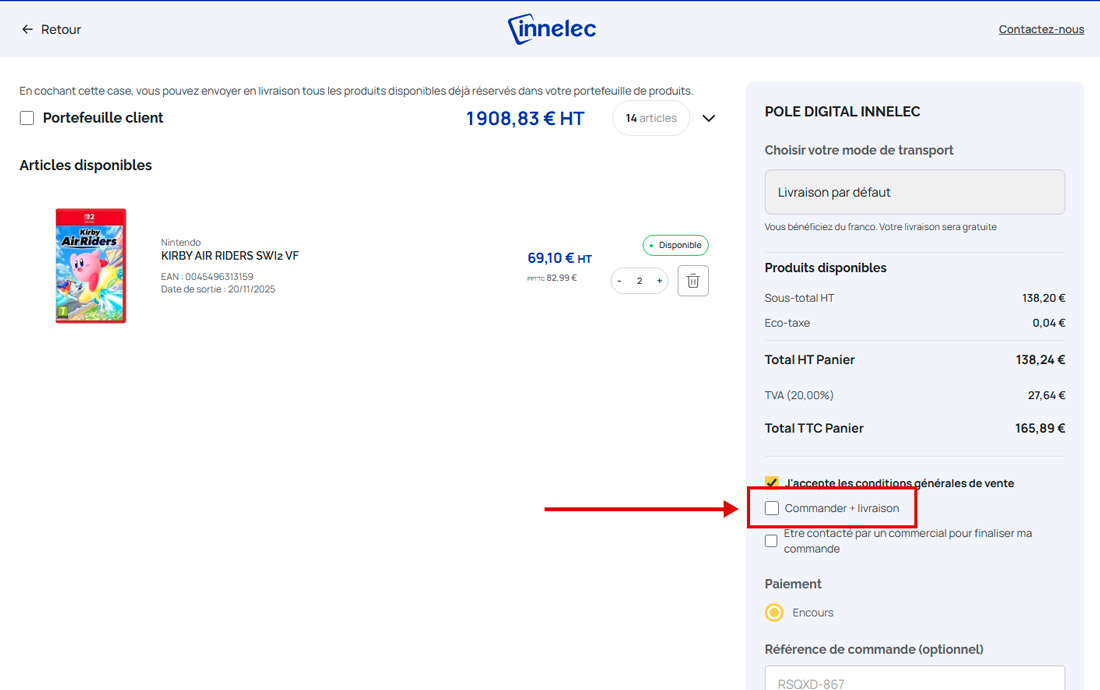
To add an order reference to your basket, there is a field to fill in when you finalise your order. Simply fill in the ‘order reference’ field before finalising your order to ensure that the information is taken into account.
To view all your orders awaiting delivery and your backorders, go to My Account > Product Portfolio.
This page gives you a clear overview of:
- your reserved products ready for delivery
- your backorders
- the current status of your free delivery.
NB: Your free delivery does not take into account your backorders, only the products available and ready to be shipped.
Yes, you can add any product to your favourites. To do so, click on the 🩷 icon at the top right of a product image. This works from a product page or directly on the thumbnail images on the search results pages. To view your favourite products, click on the 🩷 icon at the top left of the menu or go to My Account > Favourites.
To reorder a product, go to My Account > Reorder. There you will find all your previous order references. By clicking on the ‘+’ in the Quantity column, you will automatically add the products from the order in question to your basket.
All features, from adding items to your basket to requesting delivery and creating lists of favourite products, are available on mobile devices, just as they are on your computer.
Go to My Account > Paybox. You can add your card on the secure website using the 3D Secure function to pay for your orders.
Tip: Using a deferred debit card can give you 30 days to pay for your purchases.

Fast and reliable delivery
Fast delivery across Europe

Dedicated B2B customer support
A team on hand to answer all your questions

Secure payments
Orders and payments processed on a secure professional platform
