



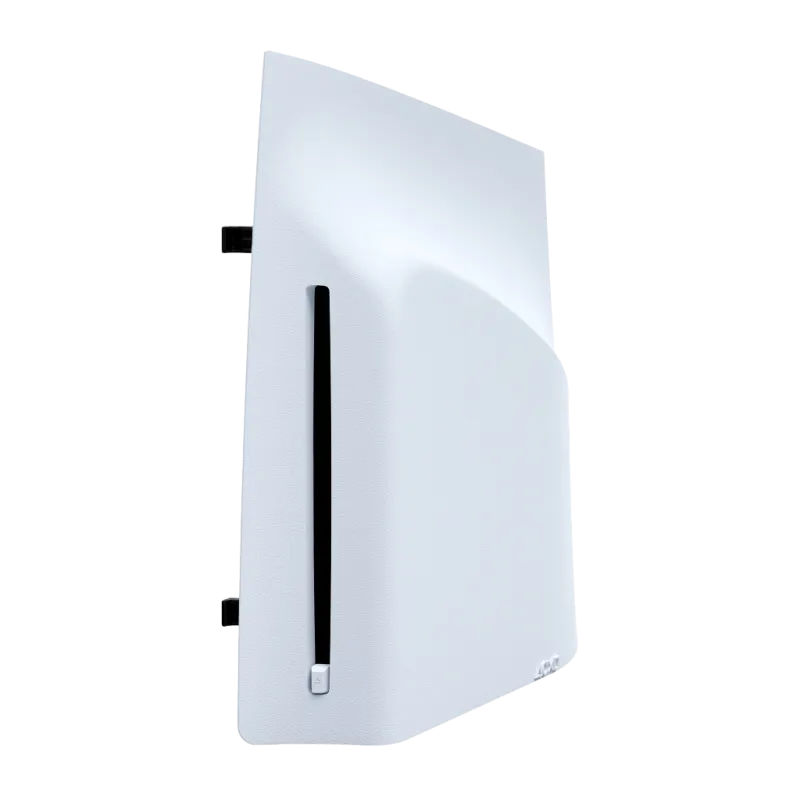


P5 LECTEUR DE DISQUE DETACHABLE
MSRP €79.99
REF : 78779000018
EAN : 0711719580799
Compatibility : PS5
Disc drive for PS5 digital edition consoles
 Easily attach the disc drive to your PS5™ Digital Edition or PS5™ Pro console.
Play PS5™ games and a wide selection of compatible PS4™ titles.
Enjoy movies and TV shows on 4K Ultra HD Blu-ray™, Blu-ray™, and DVD discs.
Easily attach the disc drive to your PS5™ Digital Edition or PS5™ Pro console.
Play PS5™ games and a wide selection of compatible PS4™ titles.
Enjoy movies and TV shows on 4K Ultra HD Blu-ray™, Blu-ray™, and DVD discs.
 Quantity min. 1 unit

Disc Drive for PS5™ Digital Edition Consoles
Add a disc drive to your PlayStation®5 Digital Edition console (slim model)*.
Play PS5® games and an extensive catalog of compatible PS4® games on Blu-rayTM discs. Watch your movies and TV shows on 4K Ultra HD Blu-rayTM discs, Blu-rayTM discs, and DVDs.
Key features of the PS5™ Digital Edition Console Disc Drive
Discover games and movies on Blu-ray™ discs
So many games
Play PS5™ games and an extensive catalog of compatible PS4™ games on Blu-ray™ discs.
Exceptional entertainment
Watch your movies and TV shows on 4K Ultra HD Blu-ray™ discs, Blu-ray™ discs, and DVDs.
How to install a disc drive on a PS5 console (model CFI-2000 - slim)
Place your console on a soft cloth on a flat surface before installing your disc drive.
Step 1
Go to the Control Center, then select Power > Turn Off PS5. The screen will go black, then the power indicator will flash white before turning off.
Step 2
Unplug the power cord and cables, then wait for the PS5 console to cool down. The main unit of your console may be hot if you have just been using it.
Step 3
Place the console with the bottom facing up and the front facing you, then remove the horizontal stand feet (short ones).
Step 4
Gently lift the Circle front panel away from the console, removing its clips to detach it.
Step 5
Align the disc player’s clips with the two holes (marked by an upside-down triangle), then push firmly until you hear a click.
Step 6
Attach the Circle front panel and the horizontal base feet (long) included with your disc player. Align the front panel clips with the corresponding holes on the console and push until you hear a click.
Step 7
Plug in the power cord and cables, then turn the console back on.
- Store the front panel and feet removed in steps 3 and 4 in a safe place. You will need these to use the PS5 console without a disc drive.
- An internet connection is required to pair the disc drive with the PS5 console during setup.
- Side panel
- PlayStation 5
- White
You may also like

Fast and reliable delivery
Fast delivery across Europe

Dedicated B2B customer support
A team on hand to answer all your questions

Secure payments
Orders and payments processed on a secure professional platform
